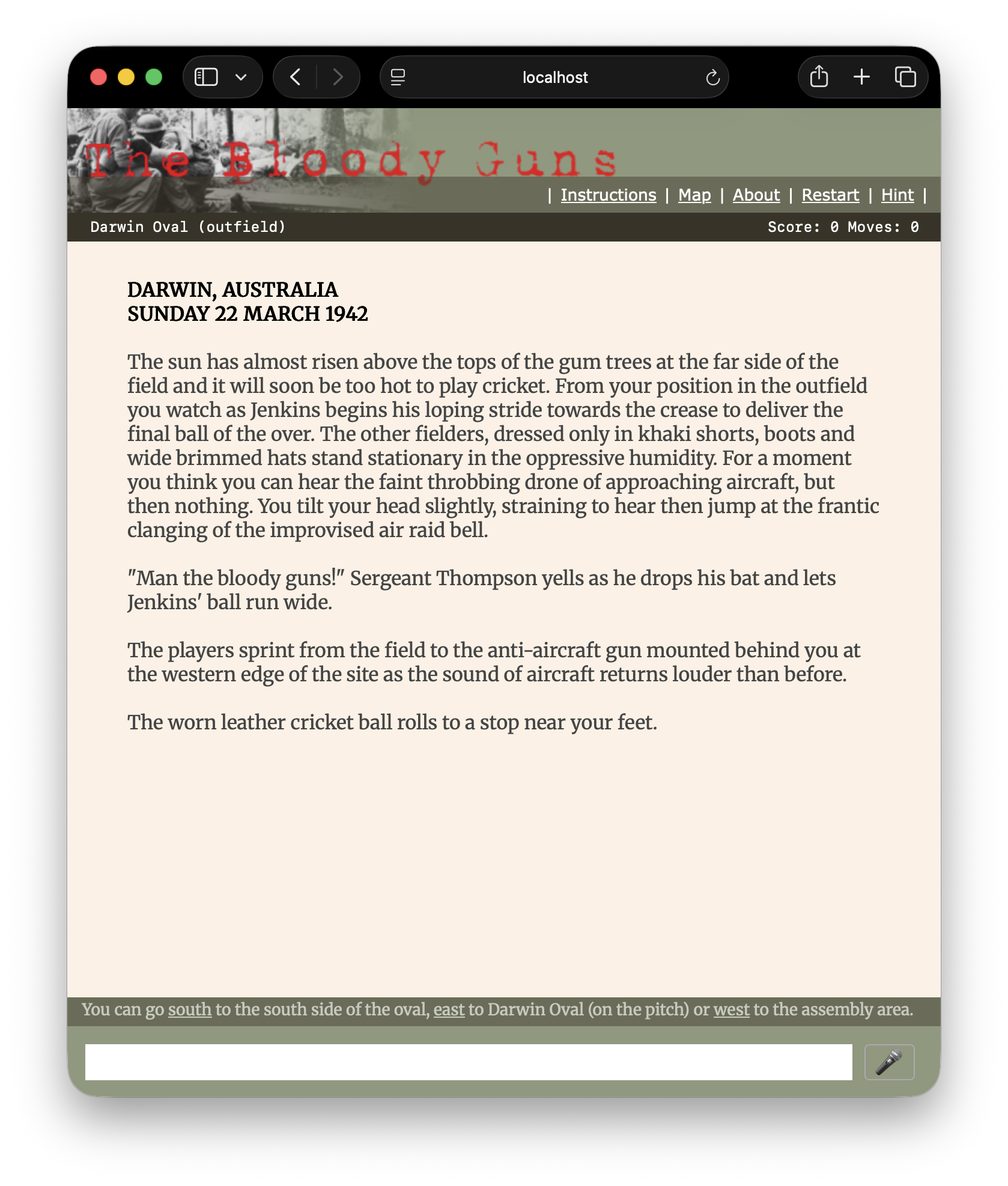
The library file webinterface.library ships a complete web frontend for cgijacl-served games. The earlier three-mode swap (Ajax / Standard / GUI) has been retired in favour of a single hyperlinked layout: a maintext window above a status bar, with a directions strip and command prompt in the footer. Several library hooks and <jacl-*> DOM markers let the interpreter drive incremental updates without forcing a full page reload.
Below is a screen shot of the web interface in use:
 |
If you want your game to be playable using the link bar and command form alone, design each puzzle so it can be reached via the verbs the interface exposes — the link bar is a supplement to typed input, not a replacement for it. |
To use this web interface include the library at the bottom of your game file:
#include "webinterface.library"
#include "webinterface.css"
Once included, define the appearance constants you want to override. Here are the values from The Down Dragon, as shown in the screenshot above:
constant title_image       "/images/dragon.png"
constant footer_image      "none"
constant header_colour     "#42596d"
constant linkbar_colour    "#3f3527"
constant maintext_colour   "#dddddd"
constant title_colour      "black"
Colours can use any value the CSS specification accepts; hexadecimal RGB gives the finest control over shade.
For per-scene background pictures, set the string current_image to a URL at any time during play. The footer's picture pane will display whatever current_image currently points to (use "none" to hide it).
The library's +header function builds a left-to-right strip of buttons using the hyperlink opcode:
hyperlink "Instructions" "instructions" "header"
hyperlink "Map"          "map window"   "header"
hyperlink "About"        "about"        "header"
hyperlink "Restart"      "restart"      "header"
hyperlink "Hint"         "hint"         "header"
hyperlink label command class writes an anchor element that, when clicked, submits command through the game's normal parser. class is the CSS class applied to the link (the bundled stylesheet defines a header class for link-bar buttons, but you can use any class you like). You can call hyperlink from any function, not just +header, to embed clickable verbs anywhere in the output. Under Glk the opcode degrades gracefully — the label is written as plain text and the command argument is ignored.
The Google sign-in button is appended to the link bar automatically when google_client_id is configured (see the HTTP chapter for the full Google Sign-In setup).
The page emitted by +header and +footer exposes a fixed set of element IDs that the interpreter and ajax response handler rely on. If you customise the layout, keep these landmarks intact:
| Element | Purpose |
|---|---|
| #main | The scroll container. |
| #maintext | The game's running text output. The interpreter writes here. |
| #statuswin | The status bar (above maintext). |
| #footer .directions | The exits list, refreshed after every turn. |
| #commandForm | The form used to submit player input. |
| #JACLCommandPrompt | The text input emitted by the prompt opcode. |
The interpreter emits a small set of marker elements that the front-end interprets out-of-band. They never appear in the visible text — the JavaScript handler strips them after acting on them.
| Marker | Emitted by | Effect on the page |
|---|---|---|
| <jacl-clear> | the clear opcode | Wipe everything in #maintext above this marker. |
| <jacl-timer data-ms="N"> | the timer N opcode | Begin firing ?rpc=timer ajax calls every N milliseconds. timer 0 cancels. |
| <jacl-status data-lines="N"> | status writes | Replace the contents of #statuswin with the marker's inner HTML. |
| <jacl-directions> | the library's +library_eachturn | Replace the exits strip in the footer. |
| <audio data-jacl-channel="N" data-jacl-pending="1"> | the sound opcode | Start playing on logical channel N. |
| <jacl-sound-stop data-jacl-channel="N"> | sound 0 N | Stop channel N. |
| <jacl-sound-volume data-jacl-channel data-jacl-level> | volume changes | Set the gain on channel N. |
After every turn-consuming command, verbs.library's +system_eachturn calls into +library_eachturn, which wraps the current exits in a <jacl-directions> marker. The ajax handler then swaps the marker's contents into the footer's directions strip so the bar stays current after movements, door opens and the like.
The status bar is rendered into a virtual character grid sized by status_window_width. On the web, that width is set by the JavaScript front-end — on page load and on every browser-window resize event — via a status_cols URL parameter sent with each ajax request. When only the window has resized (no command typed), the library fires a debounced ?ajax=true&rpc=resize&status_cols=N request that asks the engine to re-render the bar at the new width. The response carries a fresh <jacl-status> marker which the page applies to #statuswin. Stale resize responses (one arrived after a newer one or after a real command response) are detected via a monotonic token and discarded.
The library sets window.jaclSubmitInflight = true when the player presses Enter and clears it when the server response arrives (success or error). The command input is disabled during the round-trip. Custom JavaScript that pokes #JACLCommandPrompt directly should check the flag before assuming the field is editable, and should respect it as a hint that another submit is pending.
The web build supports two opcodes for asking the player a one-off question without consuming a turn:
getyesorno var
getnumber var low high
When either runs, the interpreter records the question type in pending_question_type (and, for getnumber, the bounds in pending_number_low and pending_number_high) and the page enters a special input state in which the next command is parsed as the answer rather than as a verb. The library's +game_intro scaffold relies on this to ask the voice and sound preferences before the opening prose runs — your +intro re-enters after each answer until both questions have been resolved.
You can opt out of the voice / sound questions for utility games (life, blackjacl, etc.) by setting skip_intro_preferences to true in your +intro before calling +game_intro.
Browser SpeechSynthesis is used to read game output aloud. The player can enable it with voice, disable it with silence or mute, list the available voices with voices, and pick a specific one with voice n. The library tracks the current state in voice_enabled; the +startup_preferences hook in +game_intro asks the player up front whether they want it on.
+game_intro in webinterface.library provides a standard intro scaffold for web games. Provide two functions in your game:
Your +intro shrinks to whatever per-entry state your game needs plus execute "+game_intro":
{+intro
set player = kryten
execute "+game_intro"
}
The web build re-enters +intro after every pending-question answer (TOTAL_MOVES is still 0 throughout this window), so the scaffold uses the guards intro_dedication_shown and intro_scene_shown to fire each block exactly once. Under Glk the scaffold runs straight through synchronously because getyesorno blocks for input.
By convention each game's +game_scene starts with clear so the opening prose appears at the top of a fresh window once the dedication and Q&A have been answered. Doing the clear inside +game_scene keeps it gated by the same flag that protects the scene block.